A documentation site begins with a product and a handful of pages. Then the product gets teams.
Teams get navigation labels. Releases add pages faster than old answers leave, until the sidebar reads like a seating chart for a company the reader does not work for.
The familiar response is a redesign: buy a platform, draw a cleaner tree, and drag the pages into it. That moves the furniture while duplicate answers keep arguing in the cupboards.
Organize documentation around the routes readers take through the product, not the org chart that produced it. My test is simple: each navigation choice should narrow the reader's next decision.
If a label exposes ownership but not action, it belongs in repository metadata, not the menu.
Inventory the mess before drawing the menu
Freeze the current state before debating labels. The inventory should show what a page claims to do, which product state supports it, and what should happen to its URL.
A new tree drawn without that record protects the loudest pages and loses the quiet links nobody thought to inspect.
Record page jobs and evidence
Start with fields that separate location from purpose. The following URLs and API page names are illustrative, not live migration targets:
| Field | Example |
|---|---|
| Current URL | /developers/api-auth/ |
| Page title | API authentication |
| Reader task | Send an authenticated API request |
| Audience | Application developer |
| Page job | How-to guide |
| Product area | Platform API |
| Lifecycle stage | Setup |
| Evidence | Current schema and inbound links |
| Overlap | /getting-started/api-key/ |
| Proposed action | Consolidate and redirect |
If "keep" means somebody likes the page or "delete" means the traffic was never checked, the inventory has not separated evidence from preference.
Use repository searches to catch duplicate language and inbound links.
These patterns and directories illustrate the search. Replace them with the repository's real terms and paths:
rg -n -i 'api authentication|create.*api key|authorization: bearer' content/
rg -n '/developers/api-auth/' content/ templates/ static/
If two pages answer the same task, flag the collision before moving either URL. If they share a subject but one teaches a procedure and the other records exact fields, keep both and state the boundary.
Refuse the equal-card inventory
A spreadsheet with URLs and titles is not an audit. It makes a current reference page and an abandoned announcement look equally alive.
Add a source for product truth, a canonical decision, and a migration action. Do not move a page before deciding whether its answer is still true.
Build routes through the product lifecycle
Readers arrive with work already in motion. They are evaluating, setting up, building, operating, recovering, or changing.
Those states create stronger routes than department names.
Map representative tasks before naming sections:
- Decide whether the product supports a required use case.
- Create credentials and send a first request.
- Add a capability to an existing integration.
- Diagnose a failed request.
- Prepare a production deployment.
- Upgrade without breaking supported behavior.
Give setup, routine use, failure, and change visible destinations. A glorious quickstart followed by a search box is not a product route.
Separate audiences only when their routes differ
An administrator and an application developer may both need authentication documentation. Give them separate routes when permissions, terminology, or actions diverge.
Do not create an Administrators section merely because the product has an administrator role.
Test the split with two illustrative starting-state sentences. The roles and API-key task are hypothetical:
Administrator: I need to define which roles may create API keys.
Developer: I have an approved role and need to send an authenticated request.
The audience split earns its place because the actions and evidence differ. If both sentences lead to the same task, one section is wearing an org-chart costume.
Keep page types close to the task
The Diataxis framework distinguishes tutorials, how-to guides, reference, and explanation by reader need. That distinction does not require four giant buckets at the top of a site.
Put a deployment explanation beside the deployment procedure when the decision depends on it. Keep API reference recognizable because a developer may browse it directly.
The route wins over taxonomic purity.
If a reader must leave "Deploy" for a generic "Concepts" section to understand the choice the deployment page presented immediately before, move that explanation beside the procedure.
Give each navigation layer one job
Global navigation, section navigation, and the page outline answer different questions. Repeating the same links at each layer does not improve findability.
It makes the page feel trapped inside repeated copies of the same menu.
Give each layer one decision, then remove links that merely echo the layer above it.
Let global navigation choose a content route
The top level should survive feature releases. Labels such as Guides, API reference, SDKs, Release notes, and Support can remain meaningful while product capabilities change underneath them.
A feature name that may disappear in the next release is too narrow for the global bar. Use labels that still describe the content after a team rename or feature consolidation.
Let section navigation expose the local route
The sidebar should answer what belongs to this product area and what comes next. A useful sequence might be Start, Build, Operate, Troubleshoot, and Upgrade.
The AWS Lambda developer guide visibly separates AWS-level navigation, the Lambda guide tree, breadcrumbs, and the current page outline. That public structure is evidence of distinct navigation jobs, not proof that its labels belong on another product.
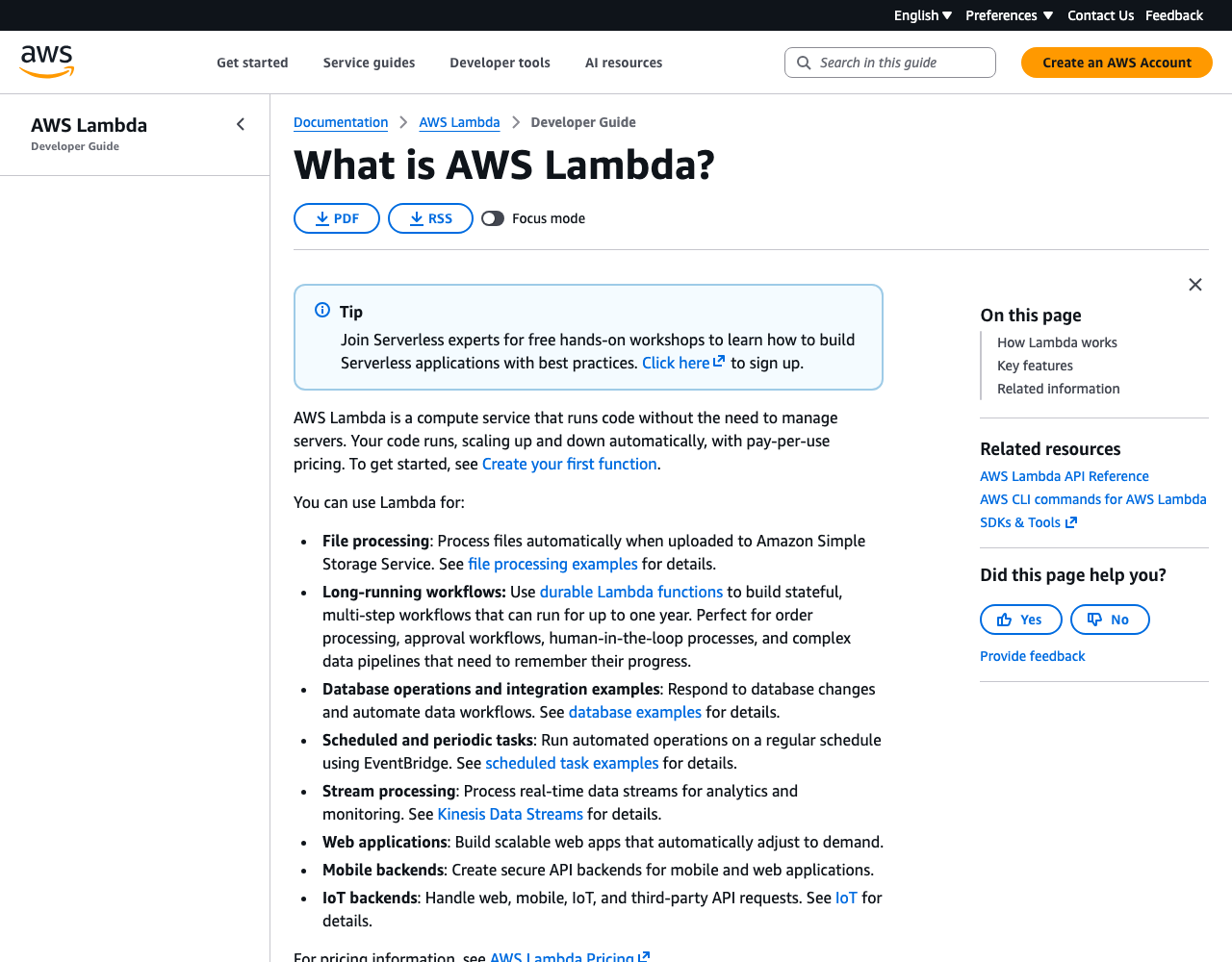
The header chooses a destination. The sidebar locates the page inside Lambda, and the page outline exposes only the current document.
Remove a local link when it opens the full product library or repeats a global destination without narrowing the reader's choice.
Let headings expose the page argument
An on-page table of contents can help someone scan a long document. It cannot rescue a page that combines five independent tasks.
W3C's page-structure guidance covers headings, regions, labels, and content structure. Use one descriptive H1 and ordered heading levels.
If the page outline reads like a miniature site map, split the page instead of making the table of contents taller.
Make landing pages choose, not stall
A landing page should answer what the section helps someone do, where a new reader starts, and which branch fits a returning reader. A wall of twelve equal cards answers none of those questions.
It hands the decision back with nicer borders.
Make each branch state its condition
Use a short decision table. These API routes are illustrative rather than navigation for a live product:
| Reader state | Start here | Proof of fit |
|---|---|---|
| Evaluating the API | API overview | Supported use cases and limits are visible |
| Sending a first request | Quickstart | A test response is the finish line |
| Adding one capability | How-to guides | The reader already has a working integration |
| Looking up a field | API reference | Exact types and constraints are present |
| Recovering from failure | Troubleshooting | Symptoms lead to diagnostics and recovery |
If the cards differ only by topic name, rewrite them around the reader's starting state and destination.
Make the first link carry a real decision
"Get started with the JavaScript SDK" remains useful outside its paragraph. "Learn more" does not.
Read the link text without surrounding prose. If the destination becomes ambiguous, rewrite the link.
If the first screen offers four equally weighted starting points, decide which reader state each one serves or remove the false choice.
Choose canonical answers before moving URLs
A page may appear in several routes while keeping one canonical home. Copying its instructions into each section creates competing search results and guarantees that one copy will rot.
GitLab's documentation folder guidance assigns distinct paths to user, administration, API, development, installation, update, and tutorial documentation. The exact folders belong to GitLab.
The observable principle is that a path has a stated content boundary.
Separate shared subject from duplicate intent
An authentication guide and authentication reference may share nouns without duplicating a job. The following ownership split is illustrative:
| Page | Owns | Does not own |
|---|---|---|
| Authentication guide | Create, store, use, rotate, and recover a key | Complete field and error schema |
| Authentication reference | Schemes, header format, scopes, status codes, and errors | The end-to-end setup path |
If both pages contain the same setup procedure with different update dates, choose one procedure owner and make the other page link at the decision boundary.
Move a URL only when the page moved
Navigation wording can improve without changing a path. Preserve the URL unless it misstates the product or the canonical content genuinely moved.
When a path must move, record a direct destination and reason. The following paths are fictional migration examples:
| Old URL | New URL | Reason | Action |
|---|---|---|---|
/developers/api-auth/ |
/docs/guides/authentication/ |
Procedure consolidated | Permanent redirect |
/getting-started/api-key/ |
/docs/start/create-api-key/ |
Duplicate setup path | Permanent redirect |
/resources/errors/ |
/docs/api-reference/errors/ |
Reference moved | Permanent redirect |
Do not send removed pages to the documentation homepage. A generic home does not preserve the old intent.
Return a clear 404 when no equivalent answer exists.
Test labels before rebuilding the platform
A spreadsheet, plain-text tree, or clickable prototype can expose a bad route before a migration makes it expensive. You do not need a new documentation platform to learn that "Resources" means nothing.
The prototype must let a reviewer choose a destination and explain the choice without help from the person who designed the tree.
Run findability prompts
Give a reviewer tasks without naming the target section. The following errors, versions, and requests are illustrative prompts:
- Your webhook signature check returns
401. Where do you look? - You need to confirm whether Node.js 24 is supported.
- You have credentials and want to send a first Python request.
- You are preparing an upgrade from version 2 to version 3.
Ask them to choose a destination and explain the label. When two labels appear equally plausible, or search is the only route to an ordinary task, rename or restructure the route.
Give each page one parent
Export the proposed URLs and assign one primary parent. Then ask the reverse question: does each landing page identify its immediate children and the decision between them?
The paths below are an illustrative tree:
/docs/start/                         parent: /docs/
/docs/start/create-api-key/          parent: /docs/start/
/docs/guides/authentication/         parent: /docs/guides/
/docs/api-reference/authentication/  parent: /docs/api-reference/
Repair an orphan, a page with two primary parents, or a landing page that contains no route to its declared children before migrating content.
Reorganize a fictional API documentation site
Orbit is a fictional product used to make the decisions visible. Its page count, support behavior, and navigation are not client history or market evidence.
Assume its current navigation says Getting Started, Guides, Features, Developers, Resources, API, Help, and Learn. The same authentication procedure appears under Getting Started, Developers, and API, while errors and upgrades have no predictable home.
Draft routes before sections
The inventory exposes five reader routes:
- Evaluate the API and choose an integration method.
- Create credentials and send the first request.
- Build imports and webhooks.
- Operate the integration through errors, limits, and monitoring.
- Upgrade API versions and SDKs.
Those routes produce this first tree for fictional Orbit:
Documentation
|-- Start
|   |-- API overview
|   |-- Create an API key
|   `-- Send your first request
|-- Guides
|   |-- Authentication
|   |-- Imports
|   `-- Webhooks
|-- API reference
|   |-- Authentication
|   |-- Endpoints
|   `-- Errors
|-- SDKs
|   |-- JavaScript
|   `-- Python
|-- Operate
|   |-- Troubleshoot requests
|   `-- Monitor usage
`-- Change
    |-- API versions
    |-- Migration guides
    `-- Release notes
"Start" remains small. "Operate" and "Change" stop the site from treating a first response as the end of the product.
Resolve authentication without duplicating it
The guide owns obtaining, storing, using, rotating, and recovering a key. The reference owns schemes, headers, scopes, status codes, and the error schema.
The two old setup pages satisfy the same task, so their useful material moves into Create an API key and both old URLs redirect there. The fictional migration decision does not recommend moving a live URL without traffic and link evidence.
Test one landing page before migrating the tree
Build the Start page with real prototype links and give reviewers this prompt:
You have an account but no credentials. Find the shortest supported route to a successful test API response.
If reviewers open API reference before Create an API key, change the label or placement. If they finish setup but cannot prove the request worked, repair the task page.
Do not blame the reviewer for exposing a weak route.
Audit route failures after launch
Use observed behavior without turning one signal into fake certainty:
| Observation | Possible defect | Next check |
|---|---|---|
| Search repeats a visible navigation label | Label may be hidden or misplaced | Run the same findability prompt |
| Old URLs remain common entrances | Redirect or inbound links may be stale | Inspect referrers and redirect hops |
| Readers move between two setup pages | Canonical task may be unclear | Compare the two page jobs |
| Support links bypass landing pages | Landing route may not reach the answer | Ask why the direct link was needed |
A lower bounce rate alone does not prove the structure works. My standard is stricter: the evidence should identify a reader decision and a route repair.
The documentation accessibility checklist can catch structural barriers before the migration ships.
Documentation organization checklist
- Inventory page jobs, evidence, overlap, canonical decisions, and migration actions.
- Build routes through setup, routine use, failure, and change.
- Give global, section, and page navigation distinct jobs.
- Test landing-page labels before migration.
- Preserve one canonical URL and use direct, evidence-backed redirects.
- Turn post-launch observations into named route checks.